External solvers
WELSIM is a simulation software that supports multiple solvers and is one of the most comprehensive and widely compatible pre- and post-processing tools for open-source solvers in the world. Currently supported open-source solvers include FrontISTR, Elmer FEM, OpenRadioss, CalculiX, SU2, Palace, and LAMMPS. Each of these solvers offers distinct features and advantages, allowing users to choose the one that best suits their needs. Thanks to WELSIM’s powerful pre- and post-processing capabilities, the time required for modeling when using these solvers is significantly reduced.
This section primarily introduces the details and usage methods of external solvers.
Configuration
When invoking external solvers, a simple configuration of the solver paths is required. Users only need to go to the Preferences interface, select Solvers, and configure the solvers accordingly. The configuration interface is shown below.

Details of each supported solver are provided in the table below. This table includes solver information, integration and calling methods with WELSIM, support status for preprocessing and postprocessing, and whether they are included in WELSIM's installer.
| Solver | Download Site | Connection Type | Pre-processing | Post-processing | Included in the installer |
|---|---|---|---|---|---|
| Elmer FEM | https://elmerfem.org | Path | Yes | No | No |
| OpenRadioss | https://openradioss.org | Path | Yes | Yes | No |
| FrontISTR | https://frontistr.com | File | Yes | Yes | Yes |
| CalculiX | https://calculix.de | File | Yes | No | No |
| Palace | https://awslabs.github.io/palace | File | Yes | Yes | Yes |
| SU2 | https://su2code.github.io | File | Yes | Yes | Yes |
| LAMMPS | https://lammps.org | File | Yes | Yes | No |
Due to restrictions of the GNU open-source license, Elmer FEM, OpenRadioss, CalculiX, and LAMMPS are not included in WELSIM's installer and require users to download them independently. You can configure these solvers through the Preferences in WELSIM.
Default solver
For different types of simulation analyses, WELSIM automatically sets a default solver. However, users can also manually specify the solver to be used. As shown in the figure below,
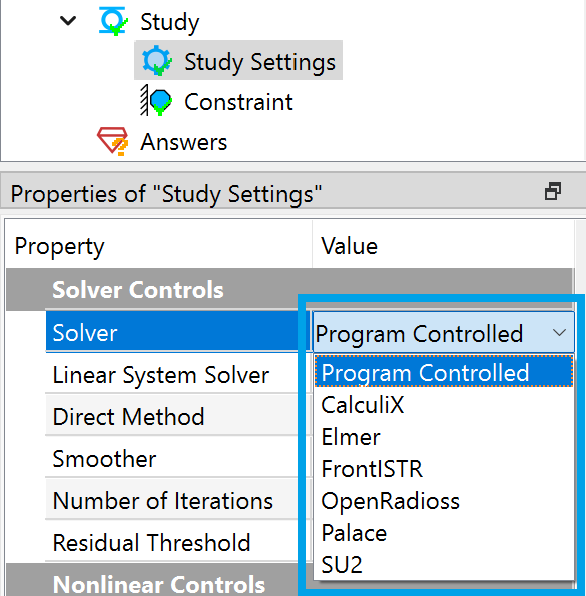
When the user selects Program Controlled, the system automatically assigns a solver based on the following logic:
- If the analysis type is structural and explicit transient is not enabled, the system automatically uses the FrontISTR solver.
- If the analysis type is explicit structural dynamics, the system automatically uses the OpenRadioss solver.
- If the analysis type is thermal, the system automatically uses the FrontISTR solver.
- For fluid analysis types, the system automatically uses the SU2 solver.
- For electromagnetic analysis types, the system automatically uses the Palace solver.
- When the project type is molecular dynamics, the system automatically uses the LAMMPS solver.
WelSim is not directly affiliated with Elmer FEM, FrontISTR, OpenRadioss, CalculiX, Palace,SU2, and LAMMPS. References to these open source solvers are solely for technical blog purposes and software usage guidance.